Connect your providers
Authorize RevenueCat through OAuth with read-only reporting access, or connect Stripe accounts with restricted keys stored in your Mac’s Keychain.
A universal Mac revenue view for indie developers worldwide
Check Stripe and RevenueCat revenue from your Mac’s menu bar, then get back to building. OtterTally brings the key numbers and their context into one quiet view.
 OtterTallyFileEditViewWindowHelp
 $12,4809:41 AM9:41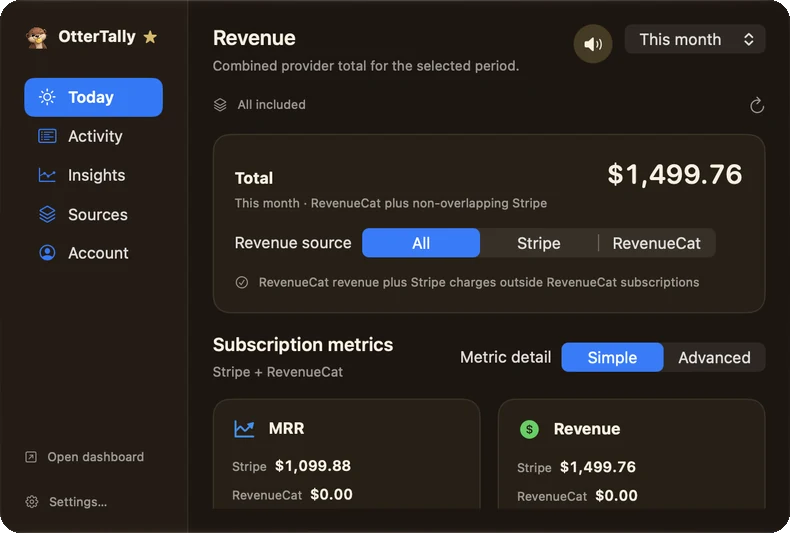
Revenue answers should be quick to find. OtterTally keeps totals, comparisons, and project context close at hand, without another dashboard to interrupt your work.
A focused workflow
Authorize RevenueCat through OAuth with read-only reporting access, or connect Stripe accounts with restricted keys stored in your Mac’s Keychain.
Select the projects and accounts you want to view and include in totals. Provider data stays on your Mac.
Open the menu-bar popover for totals, comparisons, trends, and data freshness.
Designed around the source
OtterTally brings read-only reporting from RevenueCat and Stripe into one Mac app. It shows provider and currency context, update status, and avoids filling gaps with guesses.
See revenue beside the previous equivalent period.
Understand where revenue came from, with provider detail where supported.
See sync status, the last successful update, and cached data when offline.
Your provider credentials and reporting archive stay on this Mac.
Privacy, by design
Provider credentials are stored in Keychain and reporting data is encrypted on your Mac. The app keeps customer identifiers out of its reporting archive. Read the privacy policy.
Made for macOS
OtterTally brings Stripe and RevenueCat reporting into the menu bar, with a dashboard for deeper context.
Straightforward pricing
Keep the quick revenue glance free. Upgrade when you want deeper insights and activity.
$2.99
per month
Premium access, billed monthly.
$9.99
per year
Premium access, billed yearly.
$19.99$12.99
one-time purchase
Pay once for lifetime Premium access.
Free version
No purchase needed for the everyday revenue glance.
Prices are in USD. Purchase options are available in the app after you sign in. Monthly and Yearly are subscriptions; Lifetime is a single purchase.

OtterTally for Mac
Use OtterTally on macOS 14 or later. Connect Stripe, RevenueCat, or both to see supported revenue reporting from your menu bar.
Download for macOSUniversal app for Intel and Apple silicon
Download the macOS disk image (24.9 MB).
OtterTally is a native macOS menu-bar app. It does not support Windows or mobile devices. Provider data is stored locally on this Mac.
Report it from Profile or Settings in the app, email bugs@ottertally.app, or share it in our Discord server.
Product updates
Get occasional product news and release notes by email.